Articles
Published
Canonical URL Guide: Boost Your SEO by Fixing Duplicate Content
Discover what is canonical url and why it matters for SEO; learn how to use canonical tags to fix duplicates and boost rankings.
So, what exactly is a canonical URL? Think of it as the one "master" version of a webpage that you want search engines like Google to pay attention to. It’s a simple but incredibly important tool in your SEO toolbox. If you have several keys that all open the same office door, the canonical tag tells everyone which one is the original master key, ensuring there's no confusion. This is a critical concept for any business serious about driving traffic from buyers, not just researchers.
Why Canonical URLs are Key to Your SEO Success
Let's try an analogy. Picture your website as a massive library. If you have a dozen identical copies of the same book scattered across different shelves, the librarian—in this case, Google—gets confused. Which copy is the definitive one? Which should be shown to people searching for it?
This confusion is a real and common SEO problem called duplicate content. It happens far more often than you'd think and can quietly sabotage your search rankings by diluting your authority.
When search engines can't figure out which page is the original, they have to guess. This guesswork can split your SEO value, dilute the power of your hard-earned backlinks, and sometimes even lead to the wrong page showing up in search results. A canonical URL cuts through the confusion by giving a clear command, ensuring all that ranking power flows to a single, preferred page.
How Duplicate Content Happens on Your Website
Most duplicate content isn't intentional. You're not just copying and pasting pages. Instead, it usually pops up because of the technical way websites are built. For any business trying to attract high-value customers, finding and fixing these duplicates is a crucial first step.
Here’s a breakdown of the most common culprits. Seeing these examples can help you spot potential problems on your own site.
Cause of Duplication | Example URL | What Search Engines See |
|---|---|---|
HTTP vs. HTTPS |
| Two separate, insecure and secure versions of the same page. |
WWW vs. non-WWW |
| Two different homepages. |
URL Parameters |
| A unique page for every single color or size option. |
Session IDs |
| A new URL for every visitor's session. |
Trailing Slashes |
| A different page from the version without the slash. |
Spotting these issues is one thing, but fixing them correctly is another. Many businesses get tangled up in these technical SEO details. As a leading Brand Identity Agency, we see these foundational problems all the time. Getting your brand's digital foundation right from the start prevents costly mistakes down the road.
This is where true expertise makes a difference. If you want a powerful digital presence that brings in actual buyers, the team at Nextus can diagnose and resolve these core issues. Our work as a top-tier Web Design Naples FL agency ensures your site is built correctly for both your users and for search engine success.
A canonical tag is a direct instruction to search engines that says, "Of all these similar pages, this specific one is the most important. Please rank it."
This simple snippet of code, called a canonical tag, is placed in the HTML <head> section of a webpage. It's a signal that works behind the scenes to keep your website clean, efficient, and powerful. Understanding what is a canonical URL is the first step toward mastering your site’s SEO health and making sure your best content gets the spotlight it deserves.
Why Canonical Tags Are a Non-Negotiable for SEO
Getting canonical URLs right isn't just another task on a technical SEO checklist—it's fundamental to your site's ability to rank. If you don't tell Google which version of a page is the definitive one, it will make the choice for you. And trust me, Google’s guess might not be the page you want your customers to find.
Think of it like this: canonicals act as the traffic directors for your website's authority. Without clear instructions, all that hard-earned SEO value gets scattered, weakening your presence in the search results.
Consolidate Your Link Equity
One of the biggest wins from using canonical tags is the consolidation of link equity. You might have heard it called "link juice," but it's simply the authority your site gets from other websites linking to it. When you have several duplicate URLs, any backlinks they earn get split between them.
For instance, say your-site.com/service gets a backlink from one site, and www.your-site.com/service gets a link from another. Without a canonical tag, their ranking power is divided. By setting a canonical, you’re essentially telling search engines to pour all the value from those duplicate pages into one "master" URL, making it significantly stronger.
By pooling all your SEO signals into one authoritative URL, canonicals prevent the fragmentation of your ranking power, ensuring your most important pages receive the full credit they deserve.
This is a cornerstone of a solid SEO strategy. As a Brand Identity Agency, we see firsthand how aligning these technical details from day one gives a website the authority it needs to compete for transactional keywords.
Stop Keyword Cannibalization
Another huge benefit is putting a stop to keyword cannibalization. This is what happens when two or more of your own pages end up competing against each other for the same keyword. Google gets confused about which one to show, and the result is that both pages often rank lower than a single, unified page ever would.
A canonical tag clears up that confusion instantly. It sends a clear signal to Google: "This is the page I want you to rank for this topic." This eliminates the internal competition and helps the right page climb higher in search results, attracting better-qualified traffic that is ready to buy.
Optimize Your Crawl Budget
Every website is given a crawl budget—the amount of time and resources a search engine will dedicate to crawling your pages. If Googlebot wastes its time crawling ten slightly different versions of the same product page, it has less time to find your new blog post or that important new service page you just launched.
Canonicals make crawling far more efficient. You’re essentially pointing search bots away from the redundant URLs and toward the content that truly matters. This ensures your valuable pages get discovered and indexed faster, which is a key part of good technical SEO. If you want to dive deeper into how this works, our guide on what is technical SEO breaks it all down.
For any business in a competitive space, making sure your site runs efficiently is a real advantage. It’s a strategy every professional Web Design Naples FL agency uses to give their clients an edge.
Real-World Scenarios Where Canonicals Are Essential
It's one thing to talk about the theory of a "canonical URL," but it’s another to see it in action, saving a website from common SEO pitfalls. The truth is, many everyday website features and marketing tactics create duplicate content without you even knowing it, quietly chipping away at your search rankings.
Let's dig into a few practical situations where canonicals aren't just a nice-to-have—they're absolutely critical. Recognizing these scenarios is the first step to building a technically sound website that’s ready for growth.
Handling Foundational Site Versions
This is one of the most basic and yet most common mistakes I see. To you, your website is yoursite.com. But to a search engine, all of these can look like completely different websites: http://www.yoursite.com https://www.yoursite.com (The secure version) http://yoursite.com https://yoursite.com (The secure, non-www version)
If you don't have a canonical tag pointing all of these to a single, preferred version (like https://www.yoursite.com), you're essentially asking Google to index four separate homepages. This splits your authority and confuses search engines right out of the gate. A skilled Web Design Naples FL agency tackles this on day one, making sure a single, authoritative source is locked in.
By picking one master URL, you're telling Google exactly which version to pay attention to. All your ranking power gets consolidated in one place, which builds a much stronger SEO foundation.
E-commerce Product Filters and Sorting
For any online store, product filters are a must for good user experience. But from an SEO perspective, they can be a total nightmare. Every time a customer sorts by price or filters by size, a new URL is often generated on the fly.
For instance, your main category page yourstore.com/shoes can suddenly become yourstore.com/shoes?color=red or yourstore.com/shoes?sort=price_ascending. Even though the content is almost identical, search engines see them as entirely separate pages. The fix is simple: a canonical tag on all filtered pages that points back to the clean, main category URL (yourstore.com/shoes).
Marketing Campaign Tracking Parameters
We all use tracking parameters (like UTM codes) to see how our marketing campaigns are performing. A link in your email newsletter might look something like this: yoursite.com/landing-page?utm_source=newsletter&utm_campaign=summer_sale.
Without proper setup, you’ve just created another version of your landing page. If that link gets shared around and earns some backlinks, you want that "SEO juice" flowing to your core landing page, not some temporary, tracked URL. A self-referencing canonical on yoursite.com/landing-page solves this, ensuring all that hard-earned authority consolidates where it matters most.
This is the kind of proactive technical management that a strategic Brand Identity Agency handles from the start. At Nextus, we build websites with these real-world scenarios already baked into the plan, so your marketing only helps your SEO. It’s all about making sure your site is built to attract buyers, not just researchers, from the moment it goes live.
How to Implement Canonical Tags: A Practical Guide
Alright, knowing what a canonical URL is and why it matters is half the battle. Now it's time to roll up your sleeves and actually take control. Implementing canonical tags is one of the most direct, hands-on ways to fix duplicate content issues and give your SEO a real boost.
Let's walk through the most common methods. You'll see it's something you can often manage yourself—or at the very least, you'll be able to have a much more informed conversation with your web developer or agency.
The most common approach by far is adding a rel="canonical" link tag right into the <head> section of your webpage's HTML. It’s just a single line of code, and it looks like this:
<link rel="canonical" href="https://www.yourdomain.com/master-page/" />
That simple snippet acts as a direct instruction to search engines. It tells them, "Hey, out of all the similar-looking pages, this is the one that matters." Any other page with this tag will pass its authority and ranking signals over to that single, definitive URL.
Platform-Specific Implementation
Now, how you actually get that line of code onto your site depends entirely on your website's platform. The good news is that most modern Content Management Systems (CMS) do a lot of the heavy lifting for you. Still, you need to know how it works so you can double-check that it's set up correctly.
On WordPress: By far the easiest way to handle canonicals is with a good SEO plugin. Tools like Yoast SEO or Rank Math automatically add a self-referencing canonical tag to every single page, which is exactly what you want most of the time. If you ever need to point a page to a different canonical URL, you can easily override the default in the plugin's advanced settings for that specific page or post.
On Shopify: Shopify's platform is pretty smart about this right out of the box, which is a huge relief for e-commerce stores. It automatically creates canonical tags for products and collections, correctly pointing filtered or sorted URLs (like when a customer sorts by price) back to the main collection page. It’s still always a smart move to use your browser's developer tools to verify that everything is working as it should be.
Fixing these seemingly small technical details is what separates a pretty website from a profitable one. As a leading web design agency, we make sure a site’s technical foundation is built for both search engine visibility and converting actual customers. You can't have one without the other.
This flowchart gives you a great visual for spotting potential duplicate content issues on your own site.
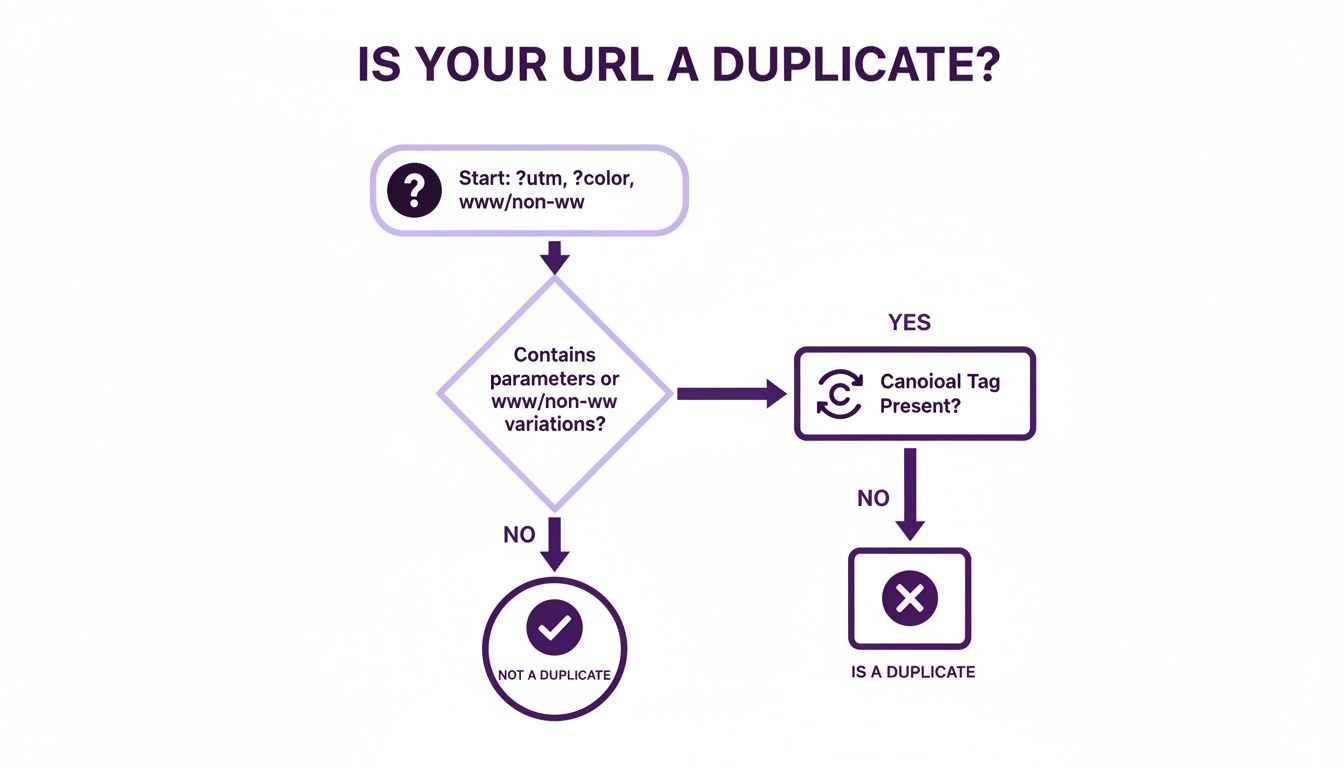
The main takeaway here is that any variation of a URL—whether it's from tracking codes, product filters, or just an inconsistent site structure—needs to be consolidated with a canonical tag to protect your SEO.
Advanced Canonicalization Methods
While the HTML tag is your go-to method 99% of the time, there are a couple of other ways to handle canonicals in more unique situations.
HTTP Headers: What about non-HTML files, like a PDF guide or a Word document you want people to download? You can't add a tag to their HTML <head> because they don't have one. In this case, your server can send a canonical link in the HTTP header response. It’s a technical solution that tells search engines where the master version lives, even for files.
XML Sitemaps: You can also specify your preferred canonical URLs in your XML sitemap. Think of this less as a direct order and more as a strong hint. While it's a good practice to include them, the rel="canonical" tag on the page itself is still the most powerful signal you can send.
Sloppy URL structures—like having both trailing-slash and non-trailing-slash versions of a URL live—create duplicates that split your site's authority. One case study showed that simply fixing these canonical issues led to a 171% spike in top-10 keywords and an incredible 407% boost in keywords ranking in positions 11-100. You can discover more about this canonicalization case study to see the staggering results for yourself.
Getting these technical details right from the start is a core part of what we do. At Nextus, our expertise as a premier Brand Identity Agency ensures these foundational elements are perfectly aligned with your business goals, preventing the kind of SEO dilution that quietly holds so many great businesses back from their true potential.
Common Canonical Mistakes That Can Harm Your SEO
Getting canonical tags right is a huge win for your SEO. Getting them wrong? That can be a real disaster, often causing more harm than not using them at all.
When you make a mistake, you're sending confusing signals to search engines. Instead of clarifying which page is the "master copy," you create a mess that can lead Google to simply ignore your instructions. Suddenly, you’re right back where you started, with duplicate content issues and diluted ranking power.
Knowing what is a canonical URL is step one. Knowing how to sidestep the common pitfalls is how you actually get results. Let's walk through the small but costly errors we see businesses make all the time.
Using Relative Paths Instead of Absolute URLs
This is probably the single most common mistake we have to fix. It’s a classic case of using a relative path (like /page-a) when you should be using an absolute URL (the full https://www.yourdomain.com/page-a).
Think of it like giving someone directions. A relative path is like saying, “the room is just down the hall.” It only makes sense if you’re already in the right building. An absolute URL gives the full street address, city, and zip code—it’s a set of instructions anyone can follow from anywhere.
Search engines need that full, unambiguous address. When you use a relative path, Google might get confused or just throw its hands up and ignore the tag completely, leaving it to guess which page to rank.
When it comes to canonicals, ambiguity is your enemy. Always use the full, absolute URL to leave zero room for interpretation. This simple rule prevents a host of technical SEO headaches.
Pointing to Non-Existent or Redirecting Pages
Another critical error is setting a canonical URL that points to a dead end—a page that serves up a 404 "Not Found" error or one that just redirects elsewhere.
Imagine telling Google, "Hey, the definitive version of this content is over here," but when the crawler follows your directions, it finds an empty lot (a 404 page) or a sign that says "go somewhere else" (a 301 redirect).
This immediately signals a broken site structure, and Google will almost certainly ignore your canonical instruction. It takes control back, and you lose your ability to guide its decision-making. A professional Brand Identity Agency often runs technical audits specifically to catch these kinds of costly errors before they do any damage.
For a business looking to bring in high-value customers, a technically sound website isn't a luxury; it's a necessity. This is why partnering with an experienced agency like Nextus, a leading Web Design Naples FL firm, is a strategic move. We make sure your site’s technical foundation is just as strong as its visual design, preventing these errors from ever costing you traffic.
How to Audit and Monitor Your Canonical Tags
It's a classic mistake to set up your canonical tags and then just forget about them. SEO isn't a one-and-done task; it’s an ongoing effort. You need to check in on your canonicals regularly to make sure they're still doing their job correctly. Catching a small issue early can prevent it from spiraling into a major SEO headache that tanks your rankings.
Luckily, you don't have to guess. Your first stop should always be the Google Search Console URL Inspection tool. It’s free, easy, and gives you a direct look at how Google sees your site. Just pop in a URL, and Google will tell you exactly which page it considers the "Google-declared canonical." This is your ground truth.
Using Advanced Tools for Site-Wide Audits
Checking pages one by one is great for spot-fixes, but for the bigger picture, you need a full site audit. This is where professional crawlers like Screaming Frog come in. These tools act like a search engine bot, crawling every single page on your website and compiling a master report on all your canonical tags.
With a full crawl, you can instantly pinpoint critical errors that might be hiding in plain sight, such as: Pages that are completely missing a canonical tag. Canonicals pointing to dead ends like 404 pages or incorrect URLs. Confusing "canonical chains" where one page points to a second, which then points to a third.
Understanding the full scope of SEO audit benefits makes it clear why this kind of regular check-up is so important for a healthy site. It’s a fundamental part of the analytics and support we provide through our AI-powered SEO services, ensuring a website's performance doesn't just spike, but grows steadily over time. If your team is struggling with these technical hurdles, Nextus can manage the entire process, letting you focus on your business.
The Payoff of Proactive Monitoring
This kind of consistent auditing isn't just about playing defense; it’s about unlocking hidden potential. The results can be dramatic. In one case study, a client fixed their mismatched canonical tags and saw a massive 320% increase in their total number of ranking keywords. Even better, they achieved a 171% jump in keywords ranking in the top 10.
That’s a huge amount of ranking power that was simply being held back by a technical error. With studies showing that over 30% of websites still don't use canonical tags properly, staying on top of your own gives you a real competitive edge. We build this diligence directly into our process, turning what seems like a small technical detail into a genuine business advantage for our clients.
Your Canonical URL Questions Answered
To wrap things up, let's go through some of the most common questions I hear from business owners about canonical URLs. Getting these final points straight will help you handle your site's SEO with a lot more confidence.
What Is the Difference Between a Canonical URL and a 301 Redirect?
This is a great question, and the distinction is important for targeting transactional keywords. Think of it like this: a 301 redirect is a permanent change of address notice you post on your old house. It tells everyone—both people and search engines—"Hey, I've moved over here for good!" and physically sends them to the new location. The old URL is effectively gone.
A canonical tag, on the other hand, is more like a quiet note left for the mail carrier (the search engine). It says, "There are a few similar-looking mailboxes here, but please deliver all the important mail to this specific one." Users can still visit the other versions (like product pages sorted by color), but search engines know which one is the master copy to rank.
Does Every Page on My Website Need a Canonical Tag?
Yes, absolutely. It's a non-negotiable best practice for every single page to have a "self-referencing" canonical tag.
This simply means the canonical tag on a page points right back to its own URL. This little piece of code acts as a powerful defensive measure. It clearly tells search engines, "This is the original, authoritative version," protecting you from accidental duplicate content problems that can pop up without you even realizing it. A dedicated Brand Identity Agency will ensure this is a standard part of your website build.
Can Google Ignore My Canonical Tag?
You bet. Google treats the rel=canonical tag as a strong hint, not an unbreakable command. If the content on your canonical and duplicate pages is wildly different, or if you create confusing signals like chains of canonicals pointing to each other, Google’s algorithm might just overrule you.
This is why checking your canonicals is a key part of any technical SEO check-up. Running a site audit to make sure Google is respecting your tags is essential. This website audit guide for founders is a great place to start if you're new to the process.
Mastering technical details like canonical URLs is what separates a good website from a great one. If you want a digital presence built for growth and designed to capture high-intent buyers, Nextus Digital Solutions can help. Our team, a top Brand Identity Agency and Web Design Naples FL expert, ensures your website is technically sound and strategically designed to attract high-value customers. Let's build something exceptional together.