Articles
Published
Fix Broken Links to Boost SEO & Brand Trust: A Guide
Learn how to fix broken links with our expert guide. Boost your site's user experience, reclaim lost traffic, and improve your SEO with actionable strategies.
A broken link seems like a small glitch, but it's a significant crack in your brand's digital foundation. For businesses serious about their online presence, these dead ends aren't just technical errors; they're lost opportunities and signals of neglect. Fixing them involves more than simple deletion. It's about strategically finding broken links, using a 301 redirect (a permanent "forwarding address" for a URL), and maintaining a clean sitemap. This guide provides actionable insights for any business, especially those seeking to partner with a top-tier Brand Identity Agency, to protect their traffic, SEO, and professional image.
The Real Cost of a Single Broken Link
Imagine a potential client clicks a link to view your portfolio or make a purchase, only to be met with a "404 Not Found" error page. That moment of friction can instantly damage their perception of your brand. It’s the online equivalent of a shop with a broken door—it communicates a lack of professionalism and care. This is a transactional deal-breaker.
This issue, known as "link rot," actively harms your business. For any company, especially one targeting buyers through a Brand Identity Agency or a specialized Web Design Naples FL firm, every digital interaction is critical. A website with dead links suggests you might be unreliable, potentially costing you valuable business before a conversation even begins.
Why Broken Links Harm Your Bottom Line
When a user encounters a broken link, they don't wait around; they leave. This increases your bounce rate, a metric search engines like Google watch closely. A high bounce rate signals a poor user experience, which can lead to lower search rankings. This is a transactional problem, not just a navigational one.
The financial impact is direct and quantifiable. Here’s how this seemingly minor issue can ripple across your business.
The Business Impact of a Single Broken Link
Area of Impact | Negative Consequence | Why It Matters for Buyers |
|---|---|---|
User Experience | High frustration and immediate site abandonment (bounce). | Buyers who have a poor experience won't return or complete a transaction. |
SEO Rankings | Loss of "link equity" and reduced search visibility. | Google penalizes sites with poor technical health, making it harder for buyers to find you. |
Brand Perception | Appears unprofessional and untrustworthy. | Your digital presence looks neglected, eroding a buyer's confidence in your services. |
Sales & Revenue | Abandoned carts and lost conversion opportunities. | A broken link in a sales funnel is a direct leak in your revenue stream. |
Crawl Efficiency | Wasted "crawl budget" on dead-end pages. | Search engine bots might miss new content designed to attract paying customers. |
Data from our own audits shows a clear correlation. We've seen sites with just a 5% broken link rate suffer a 27% drop in average session duration. For an e-commerce site, the impact is even more severe. Studies indicate that 42% of visitors will abandon their cart if they hit a broken link during checkout. For a small business, this could easily translate to $15,000 or more in lost annual revenue, a significant blow for any company aiming for growth.
A healthy link profile is a cornerstone of digital success. It tells both users and search engines that your website is reliable, well-maintained, and a credible source of information.
As a Brand Identity Agency, Nextus considers a flawless, functional website to be non-negotiable. This is especially true for businesses competing for transactional keywords where every click represents a potential buyer.
More Than Just an Error Page
The damage extends beyond user frustration. Broken links consume your "crawl budget"—the finite amount of resources Google's bots allocate to index your site. If Googlebot repeatedly hits 404 errors, it may abandon the crawl before discovering and indexing your latest service page or blog post. This directly impacts your ability to rank for keywords relevant to buyers.
Furthermore, broken links are a significant barrier to web accessibility. A key part of modern branding and web design is ensuring all users, including those with disabilities, can access your content. You can review how seriously we take this in our web accessibility policy.
Ultimately, a professional Web Design Naples FL agency like Nextus builds technically sound websites from the ground up, preventing these issues. If your site is already live, our team can perform a comprehensive audit to find every broken link, seal the leaks, and restore trust with both your users and search engines.
Your Toolkit for Finding Every Broken Link
You cannot fix what you cannot find. Before we explore how to fix broken links, we must first master identifying them. This process, a link audit, is foundational to maintaining a professional website that instills trust in both human visitors and search engine crawlers.
Fortunately, powerful tools—some free, others professional-grade—can automate this process, saving you from manually clicking every link on your site.
Start with the Essentials: Google Search Console
Your first stop should be Google Search Console (GSC). This free tool is a direct communication channel from Google, showing you which pages it couldn't access on your site. This is an actionable insight you can use immediately.
In GSC, navigate to the "Pages" report under the "Indexing" section. Find the "Not found (404)" category. This list contains pages Google tried to crawl but found missing—your initial hit list of broken links already impacting your SEO.
However, GSC primarily focuses on pages it wants to index and may not catch all broken links, especially outbound ones pointing to other websites. For a deeper analysis, more specialized tools are necessary.
Level Up with Professional Auditing Tools
For a comprehensive site analysis, tools like Ahrefs, SEMrush, and Screaming Frog are the industry standard. They crawl your website just as Google does, providing a detailed report on every internal and external link. These tools are essential for any business serious about ranking for transactional keywords.
These platforms provide a "Health Score" and flag critical issues, with broken links (4xx errors) typically at the top. This allows you to prioritize your efforts for maximum impact.
While the tools provide data, the real expertise lies in interpretation. You'll find 404 "Not Found" errors, but also other 4xx client errors or 5xx server errors. Understanding these codes is key to diagnosing the root cause. A helpful resource is a guide to fix 404 errors and reclaim lost SEO value, which can ensure you apply the correct solution.
Running an audit tool is simple. The real value comes from interpreting the results and developing a smart, actionable strategy to fix what's broken.
Running Your First Site Audit
Getting started is straightforward. With a tool like Screaming Frog (its free version scans up to 500 URLs), you simply enter your homepage URL and click "Start." The software will crawl your site in real-time.
Once finished, filter the results to show only "Client Error (4xx)" responses. This gives you a clean, actionable list of your broken links.
For each broken link, the report provides two critical pieces of information:
The broken URL: The link leading to a dead end.
The source page(s): The exact page(s) on your site where the broken link is located.
This is the precise information needed to begin repairs. While automated tools are powerful, a manual check can uncover contextual issues that software misses. A leading Brand Identity Agency like Nextus combines powerful data with strategic insight to ensure every part of the user journey is seamless, converting researchers into buyers.
Mastering Redirects for SEO and User Experience
Once you have a list of broken links, the real opportunity lies in how you fix them. This is where redirects are essential. A redirect acts as a digital mail forwarding service, guiding visitors and search engines from a dead end to the correct destination.
Properly implementing redirects is critical for protecting your link equity—a term for the SEO value passed from one page to another through links. Any authority earned by old, broken pages is lost until you set up a proper redirect. When Nextus works with clients on their branding, we treat redirect management as a non-negotiable part of protecting their online assets.
The goal is to transform a frustrating dead end into a seamless experience.
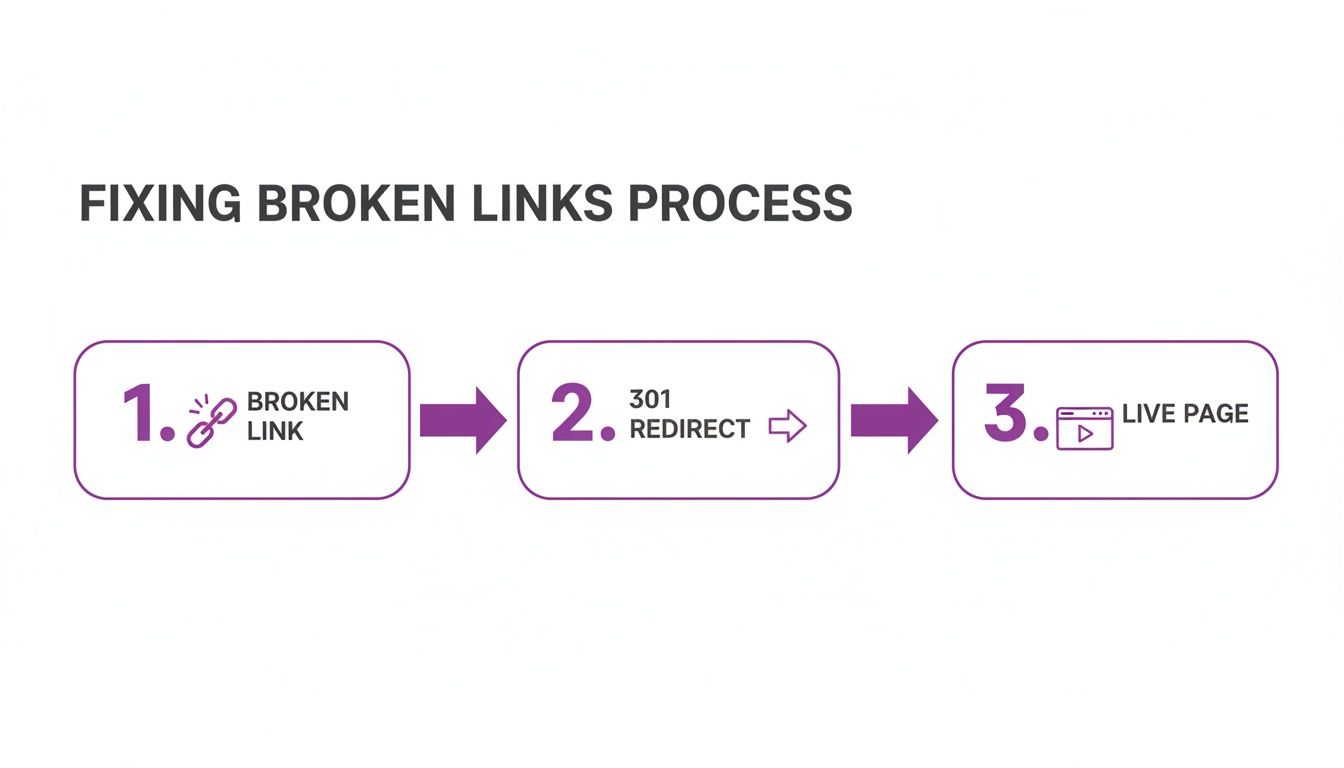
This simple flow—from a broken link, through a 301 redirect, to a live page—is the key to preserving both the user journey and your hard-won SEO value, ultimately helping you rank for buyer-focused keywords.
Permanent vs. Temporary Redirects: The 301 vs. 302 Showdown
You will primarily use two types of redirects: 301 and 302. They tell Google different things, so choosing the right one is crucial for your SEO.
A 301 redirect tells search engines, "This page has moved permanently. Update your records and pass all link equity to this new URL." This is the correct choice for fixing broken links.
A 302 redirect is temporary. It says, "This page is gone for now, but it will be back. Send traffic here temporarily, but don't pass the link equity." This is useful for A/B testing or site maintenance.
For fixing a standard broken link, a 301 redirect is almost always the correct answer. Using a 302 by mistake is a common error that can starve your new page of the SEO value it needs to attract buyers.
How to Implement Redirects on Common Platforms
The method for setting up a redirect depends on your website's technology. Here’s a quick guide for the most popular systems we encounter.
Redirecting on WordPress
If your site is on WordPress, use a plugin. The free Redirection plugin is the industry standard—it’s powerful, reliable, and provides a clean interface for managing everything.
After installation, enter the old broken URL ("Source URL") and the new page you want visitors to see ("Target URL"). The plugin handles the rest, creating the correct 301 redirect automatically. This is a perfect, actionable solution for non-developers.
Redirecting on Shopify
Shopify has a built-in redirect manager, which is incredibly simple for e-commerce stores.
From your admin dashboard, go to Online Store > Navigation and click "URL Redirects." From there, you can create a new redirect. This is essential for discontinued products, allowing you to send shoppers to a relevant category or similar item, saving the sale and improving the buyer's experience.
Redirecting on Static Sites or with Server Access
If you have a custom-coded site or server access (e.g., on an Apache server), you can set up redirects in a file called .htaccess. This method is fast and powerful, but a single typo can take your entire site offline. Precision is critical.
To set up a basic 301 redirect, add this line to your .htaccess file: Redirect 301 /old-broken-page.html https://www.yourdomain.com/new-relevant-page/
Fixing broken links and mastering redirects are fundamental to good site health and a core part of the larger SEO puzzle. To understand how this fits into a broader strategy, read our guide on what is technical SEO. Every redirect you implement is a step toward a more resilient, user-friendly, and authoritative website that attracts transactional traffic.
Turning Competitor Weaknesses Into Your Strengths

So far, we've focused on defense—fixing links on your own site. Now, it's time to go on the offensive.
What if you could find a dead link on an authoritative industry website and persuade them to replace it with a link to your site? This is the core of broken link building, a savvy SEO tactic used by experienced professionals to acquire high-quality backlinks that would otherwise be out of reach. This is how you target transactional keywords indirectly.
The process is simple: find 404 errors on other relevant sites, create superior replacement content, and then contact the site owner with a helpful suggestion. It's a win-win: they fix a poor user experience, and you earn a valuable backlink.
This is a strategic move to boost your domain authority, drive relevant referral traffic, and position your brand as an expert. At our Brand Identity Agency, Nextus helps clients leverage this tactic to become recognized leaders in their market, moving beyond generic traffic to attract real buyers.
Finding Your Opportunities
First, identify the right targets. Focus on high-authority blogs, industry publications, and even your direct competitors. A link from a site that Google already trusts carries immense weight.
To gain an edge, it's crucial to understand how to conduct competitor analysis, as this often reveals such opportunities.
Tools like Ahrefs and SEMrush are invaluable here. In Ahrefs' "Site Explorer," enter a competitor's domain, navigate to the "Broken links" report under "Backlink profile," and you'll get a list of dead links pointing to them. This is a goldmine for transactional keyword opportunities.
Look for links that once pointed to substantial content like research reports or in-depth guides. A dead link to an old "About Us" page is useless, but a 404 error on a link to a "Guide to E-commerce SEO" is a perfect opening.
Creating the Perfect Replacement Content
Once you've found a promising broken link, use the Wayback Machine to see what content was originally there. Paste the dead URL into its search to find a snapshot of the old page.
Your goal is not to replicate it, but to create something significantly better.
Update It: If the old article is outdated, refresh it with current data and new examples.
Enhance It: If the original was just text, enrich your version with custom graphics, videos, or better formatting.
Improve It: If the old content was poorly written, use clear headings and concise paragraphs to make your version more user-friendly.
Creating a genuinely superior resource makes it an easy "yes" for the site owner. It's the difference between spam and offering a solution. As a leading Brand Identity Agency, Nextus specializes in crafting content that not only replaces but vastly improves upon what's missing, helping our clients attract high-intent traffic.
The Art of a Successful Outreach Email
With your new content live, the final step is outreach. A generic email will be ignored. Your message must be personal, concise, and genuinely helpful.
A successful outreach email includes three parts:
A genuine compliment. Mention a specific article of theirs you liked. Show you've actually visited their site.
A helpful heads-up. Politely inform them about the broken link on a specific page.
A gentle suggestion. Offer your superior resource as a replacement, explaining why it's a good fit for their audience.
The data supports this approach. Generic cold outreach has a dismal 1-2% success rate. But a targeted, helpful email for a broken link can achieve a success rate over 20%. A 2026 analysis showed that 82% of link builders use tools like Ahrefs and SEMrush to find these 404 opportunities. This is how you build a powerful backlink profile that drives transactional traffic.
Automating Your Link Rot Defense
Fixing broken links is productive, but it's a temporary solution. The internet is dynamic; pages move, and content is deleted. Manual link checking is not a sustainable strategy. This is where you shift from defense to building an automated system to combat "link rot."
Instead of reacting to a broken link after it has damaged your user experience or SEO, you can be proactive. Automation is a crucial part of modern website maintenance and a key service our Web Design Naples FL team at Nextus implements post-launch to protect our clients' investments.
The goal is to move from periodic cleanups to continuous monitoring. This keeps your site running smoothly and signals to visitors that you are professional and reliable—a cornerstone of a strong brand identity.
Set Up Recurring Audits in Your Go-To SEO Tool
The simplest way to start is by using the tools you already have. Platforms like Ahrefs and Semrush are designed for ongoing monitoring.
In your project dashboard, find the Site Audit tool and schedule it to run automatically—daily, weekly, or monthly. For most businesses, a weekly crawl is ideal. It’s frequent enough to catch problems early without overwhelming you with notifications.
The tool will crawl your site on schedule and email you a summary, pinpointing any new broken links (4xx errors) so you can address them immediately. This is a simple but effective AI automation.
Level Up With Custom AI Automation Workflows
For some businesses, a weekly report isn't enough. If a link on your checkout page or primary contact form breaks, you need to know now.
This is where custom workflows using AI automation platforms like n8n or Zapier become invaluable. These no-code/low-code tools connect different apps to create automated processes. For example, you can build a workflow that:
Checks a list of your most critical URLs every 15 minutes.
If it detects a 404 error, it immediately triggers an action.
It then sends an instant alert to a dedicated Slack channel, like
#website-alerts, with the exact broken URL.
This real-time monitoring is a game-changer. You move from reactive fire-fighting to having an automated system that prevents issues from escalating.
Setting this up is more accessible than you might think. A well-designed workflow can save hours of manual work and prevent lost revenue from broken conversion paths. It’s a smart use of technology to protect your brand's digital presence. To see what's possible, explore our AI automation services.
As a Brand Identity Agency, Nextus knows that a brand's reputation depends on its technical health. An automated link-fixing system shows that you value your customer's experience, keeping your site healthy, your SEO strong, and your digital doors open for business.
Frequently Asked Questions About Fixing Broken Links
Even with a solid understanding of the basics, questions about how to fix broken links often arise. Here are answers to some of the most common points of confusion for business owners.
How Often Should I Check for Broken Links?
For most businesses, a weekly broken link check is a practical routine. This frequency is enough to address new issues before they negatively impact your SEO or user experience.
However, this isn't a one-size-fits-all rule. A busy e-commerce site with frequently changing products might benefit from daily checks. For your most critical pages—like checkout funnels or lead generation forms—real-time, automated monitoring provides the best protection for your transactional goals.
Do Broken External Links Hurt My SEO?
Yes, they do, though differently from broken internal links. Linking to a page that no longer exists doesn't create a 404 error on your site, but it does signal to Google that your content may be outdated.
More importantly, it creates a poor user experience. When a visitor trusts your recommendation enough to click a link, sending them to a dead end erodes that trust. It makes your brand identity appear unreliable. These small details are critical in converting visitors into buyers.
A website's health is judged by all its parts. Ignoring broken external links is like leaving typos on your homepage; it signals a lack of attention to detail that buyers will notice.
When Should I Just Delete a Broken Link?
While deleting a link is the quickest fix, it is rarely the best one. You should only consider removing a link if it adds zero value to the reader and has no SEO history worth preserving.
Before deleting, ask yourself: "Does removing this link make the content less helpful?" If the answer is "no," then deleting it is likely fine. In nearly every other case, a 301 redirect to a relevant, live page is the correct action. This preserves the user's path and passes any "link equity" from the broken page, which is crucial for ranking transactional keywords.
Can I Fix Broken Links Myself or Do I Need an Agency?
You can certainly fix many broken links on your own. If you're using WordPress and are comfortable with a redirection plugin, managing a few 404 errors on a smaller site is a very doable DIY project.
However, the task can become complex quickly. When facing hundreds of errors, untangling redirect chains, or trying to reclaim SEO value from a critical page, it's time to hire a professional. An expert Brand Identity Agency like Nextus does more than just patch holes; we identify root causes and build a strategy aligned with your business goals. For server-level fixes or custom code, a skilled Web Design Naples FL team ensures the job is done correctly without risking your site's stability.
At Nextus Digital Solutions, we believe a healthy website is the foundation of a powerful brand. If you're tired of wrestling with technical errors and want a website that works as hard as you do, we're here to help. Discover how our strategic approach to web design and SEO can elevate your digital presence at Nextus. Contact us today!