Articles
Published
Drive Conversions: How to Create a Website Sitemap That Boosts SEO
Learn how to create a website sitemap to improve your Google ranking. Our expert guide covers XML sitemaps, submission, and maintenance for business growth.
Creating a sitemap for your website is a critical, actionable step that goes far beyond a simple SEO checklist. It’s about handing search engines like Google a literal map to your content, showing them exactly what’s important and how to find it. This ensures your most valuable pages, the ones designed to convert visitors into customers, are seen and ranked.
Think of it this way: without a clear map, your key service or product pages might never get discovered, especially on new sites or those with complex structures. A sitemap is your way of making sure nothing gets lost and that search engines prioritize what matters to your bottom line.
A Transaction-Focused Guide to Search Engine Visibility
This simple file acts as an official blueprint for your site, a fundamental part of technical SEO. It tells search engines what you consider valuable and how all your pages connect, which is essential for getting your content crawled and indexed efficiently. A professional Brand Identity Agency will confirm that a sitemap isn't just a technical task; it's a strategic asset for brand visibility.

Why a Sitemap Is Crucial for Business Growth
The internet is an incredibly crowded marketplace. Every day, thousands of new competitors go live, all vying for the same customer attention. For businesses in competitive markets like Naples, Florida, getting noticed by motivated buyers is the primary challenge. With over 90% of all global searches happening on Google, you cannot afford to be invisible. A sitemap is a powerful, actionable tool for cutting through the noise and boosting your search visibility.
A well-structured sitemap ensures that search engine crawlers don't have to rely solely on internal links to find every page. It provides a direct, organized path to all your important content, accelerating the indexing process and getting your offerings in front of customers faster.
This is a core part of building a strong digital presence. In fact, any professional Brand Identity Agency will tell you that a sitemap isn't an afterthought—it's a strategic element that should be planned from day one to ensure search engines can systematically understand and rank your brand's most important pages. The team at Nextus, a leading agency for Web Design Naples FL, builds sitemaps strategically to drive transactional traffic, not just researchers.
Decoding Sitemap Types and Jargon
When marketing professionals talk about sitemaps, they're usually referring to one of two types. Both are useful, but they serve completely different, specific purposes.
An XML (eXtensible Markup Language) sitemap is a file created specifically for search engines. It's written in code that bots can easily read. It lists all your important URLs along with extra information, like when a page was last updated. This is the sitemap we'll be focused on for driving SEO results.
An HTML sitemap is designed for human visitors. It’s a page on your website, like a table of contents, that gives people a clear overview of your site's structure. It's great for user experience, but it’s the XML version that communicates directly with Google to improve your rankings.
You'll also hear the terms crawling and indexing. To put it simply, crawling is the process where search bots (like Googlebot) discover content on the web by following links. Once they find a page, indexing is the process of storing and organizing that content in their massive database so it can appear in search results. A sitemap makes both of these jobs faster and more accurate.
If you want to dive deeper into the technical nuts and bolts, our guide on what is technical SEO is an excellent resource. Understanding these concepts is a game-changer for any business owner serious about their online performance.
Planning Your Sitemap for Strategic Growth
Before you generate a sitemap, you must create a strategic blueprint. You wouldn't build a business without a plan, and the same goes for your website. A great sitemap is the final output of thoughtful site architecture—the logical plan that makes your site easy for people to navigate and a piece of cake for search engines to crawl. This is where you turn a simple website into a conversion-focused machine.
This is where the real work happens. It’s less about tools and more about thinking through the user journey to capture high-intent traffic.
Start with Your Core, Transactional Pages
First, let's map out the absolute essentials. What pages form the backbone of your site and are most likely to lead to a sale or inquiry? Think about the pages that every visitor, and every search engine, absolutely must find.
For nearly any business, this includes Home, About Us, Services/Products, and Contact. These are your cornerstones. From this core, everything else should branch out logically. For instance, your specific service pages live under "Services," and your proof of success belongs under "Case Studies" or "Portfolio." This kind of logical grouping makes a site feel intuitive and guides users toward conversion.
Thinking this way from the start is the best way to prevent "orphan pages"—content with no internal links pointing to them. To Google, a page with no links leading to it might as well be invisible, and it will contribute zero SEO value or sales.
Structure for How Customers Actually Search
Your site's structure is a powerful tool for attracting customers who are ready to buy, especially for local businesses. Simply having one "Services" page isn't enough to compete against a focused Brand Identity Agency or local service provider.
Let’s take a local plumber in Southwest Florida as an example. Instead of one generic page, a smarter structure would target specific, high-intent keywords by location. It would look something like this:
/services/emergency-plumbing/
/services/emergency-plumbing/naples-fl
/services/emergency-plumbing/bonita-springs
/services/water-heater-repair/
/services/water-heater-repair/naples-fl
This structure signals to Google that you are the go-to expert for specific services in specific towns. It’s a game-changer for local SEO and turns a simple website into a lead-generation engine. This is a core tenet of how we approach Web Design Naples FL, focusing on structures that attract buyers.
From Blueprint to Wireframe
Once you've sketched out this hierarchy, it's time to create a wireframe. A wireframe is a simple visual skeleton of your website. It’s not about colors or fonts; it's purely about layout, content hierarchy, and how pages connect to guide a user to a transactional goal.
This visual blueprint is what will ultimately guide the creation of your sitemap. It’s a step that requires real strategic thinking, and it’s a foundational part of our professional web design services. The Nextus team believes in turning business goals into a clear architectural plan before a single line of code is written, ensuring every page has a distinct purpose and directly supports your growth.
How to Create Your XML Sitemap
Once you’ve mapped out your site's architecture, the next step is to actually create the XML sitemap file. The good news? You almost certainly don't need to write a single line of code. Most modern website platforms come with built-in tools or easy-to-use plugins that handle all the heavy lifting for you.
Your main job is to pick the right approach for your specific setup. Whether you're running a blog on WordPress, an e-commerce store on Shopify, or a completely custom-built site, there's a straightforward path to getting this done.
The process always starts with a solid plan. You need to think about the blueprint, the hierarchy, and how to group content logically before any file ever gets generated.
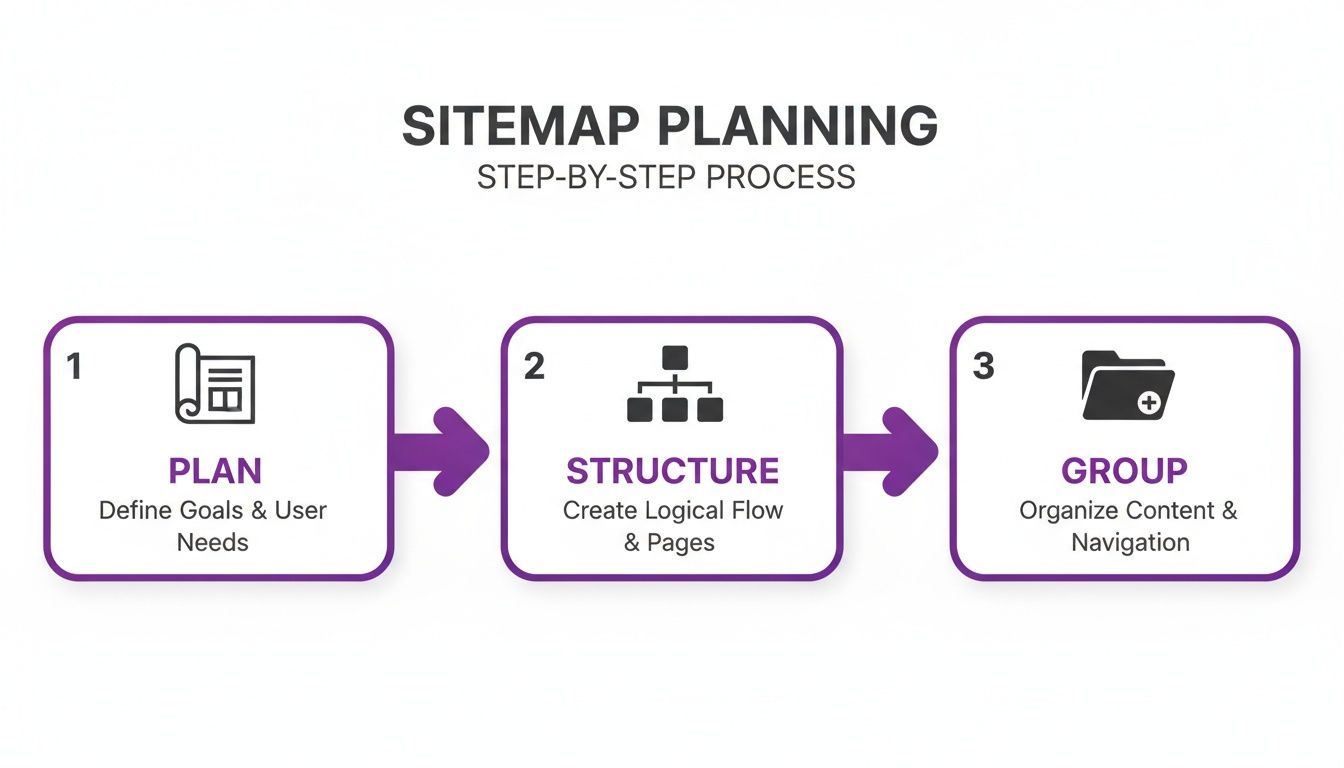
Let's dive into the most common and practical ways to create your sitemap.
Automatic Creation with CMS Platforms
For the vast majority of website owners, a Content Management System (CMS) is the heart of their online presence. Platforms like WordPress and Shopify are designed to make sitemap creation incredibly simple—often, it's a "set it and forget it" feature.
WordPress Sitemap Generation with Yoast SEO
If your site is built on WordPress, chances are you're already familiar with the Yoast SEO plugin. It’s a powerhouse for on-page SEO, and one of its best features is that it automatically generates and updates your XML sitemap. As soon as you install and activate the plugin, this feature is on by default.
Finding the sitemap it creates is easy. From your WordPress dashboard, go to Yoast SEO > General. Click on the "Features" tab. Find the "XML sitemaps" option and confirm it's toggled "On." Click the little question mark icon, then select the "See the XML sitemap" link. This takes you straight to your sitemap index file, which usually lives at a URL like yourdomain.com/sitemap_index.xml.
Finding Your Sitemap on Shopify
For e-commerce stores on Shopify, it’s even easier. Shopify handles this for you right out of the box, no plugins or configuration needed. Every store automatically has a sitemap.xml file that keeps an updated list of all your products, collections, pages, and blog posts.
You can find your Shopify sitemap by just adding
/sitemap.xmlto the end of your store’s domain. For example:yourstore.com/sitemap.xml. It's that simple.
Using Online Sitemap Generators
What if your site isn’t on a major CMS? If you have a static HTML site or a custom build without a built-in sitemap feature, an online generator is your best friend. These tools crawl your website much like a search engine does, discovering all your pages by following the links.
Great tools like XML-Sitemaps.com or the desktop-based Screaming Frog SEO Spider get the job done reliably. The process is pretty standard: enter your website’s homepage URL, let the tool crawl your site, and download the sitemap.xml file it generates. Once you have the file, you just need to upload it to the root directory of your website via an FTP client or your web hosting control panel.
Manual Creation for Custom Needs
On rare occasions, you might find yourself needing to build an XML sitemap by hand. This method gives you absolute control over every entry but does require a basic grasp of XML syntax. Each URL is wrapped in a <url> tag, and the specific page location goes inside a <loc> tag.
While tools and plugins cover most situations, a flawless, technically sound sitemap is critical for peak SEO performance. If you need to ensure every single detail is perfect, working with a professional Brand Identity Agency can be a game-changer. At Nextus, our approach to Web Design Naples FL goes beyond just beautiful design; we build and fine-tune the technical foundation, including optimized sitemaps, to deliver real business growth.
Submitting Your Sitemap to Google
Alright, so you’ve created your sitemap. That's a great first step, but just having the file on your server doesn’t actually do anything. For search engines to use it, you need to hand it over.
Think of it this way: you drew a perfect map of your new store, but it's useless until you give it to the local guide—in this case, Google. The best way to do that is through their own powerful, and completely free, tool: Google Search Console.
Your Home Base: Google Search Console
If you’re serious about your website’s performance, Google Search Console (GSC) needs to be your best friend. It’s the direct line of communication between you and Google, offering a treasure trove of data on how your site is seen, crawled, and indexed. If you haven’t set up and verified your website in GSC yet, stop everything and do that now. It's non-negotiable for modern SEO.
Once your property is verified, you can submit your sitemap. In the left-hand menu, you'll find the "Sitemaps" report under the "Indexing" section.
This dashboard is where you'll get a real, unfiltered look at your site's health from Google's perspective. It helps you find and squash technical problems before they ever impact your rankings.
In the sitemap submission area, all you have to do is paste in the tail end of your sitemap's URL. For most sites, this is simply sitemap.xml or, for larger sites, sitemap_index.xml. Hit "Submit," and you're done. Google will add it to its queue for processing.
Making Sense of the GSC Reports
After you submit the sitemap, GSC will give you a status. Don't just submit and forget—check back to see what it says. "Success" means Google found and could read your file. "Has errors" indicates a problem you need to fix, like a broken URL. "Couldn't fetch" usually points to an access issue, like a server error or a robots.txt block.
The real magic isn't in the submission itself—it's in the data you get afterward. The "Page indexing" report (formerly Coverage) is where you'll spend your time, as it shows the indexing status for every URL Google has found.
You might see a lot of pages under "Discovered - currently not indexed." This is common. It means Google knows the page exists (often from your sitemap!) but hasn't gotten around to crawling and indexing it yet. This could be because the content isn't seen as valuable, or the site lacks authority. Digging into these reports is a core part of any technical SEO routine and something the Nextus team handles for our clients.
A Quick but Crucial Step: Your robots.txt File
While GSC is the most direct way to notify Google, there's another best practice you shouldn't skip. Add your sitemap’s location to your robots.txt file. This is a simple text file located at the root of your website (e.g., yourdomain.com/robots.txt) that provides instructions to web crawlers. By adding the line Sitemap: https://yourdomain.com/sitemap.xml, you’re creating a signpost for all search engines, not just Google, helping them find your site's blueprint efficiently.
If you're unsure how this file works, this WordPress robots.txt guide is a great place to start.
Properly submitting your sitemap can lead to a more efficient crawl from Google. In a world with billions of pages, this means Google is more likely to spend its limited resources crawling your important pages instead of getting lost. By monitoring your sitemap status and indexing reports in GSC, you can catch problems early, turning a simple XML file into an active tool for growing your online presence.
Advanced Sitemap Strategies for E-Commerce and Beyond
When your website grows beyond a few dozen pages, a single, basic sitemap just isn't going to cut it anymore. For sprawling e-commerce stores, international brands, or content-heavy publishers, your sitemap strategy has to get much smarter. This is where you move past simple URL lists and start giving search engines the detailed, structured data they need to understand your most complex content.
Learning how to create a website sitemap that can handle scale isn't just a technical exercise; it's a genuine competitive advantage.

Managing Large Sites with a Sitemap Index
Every standard XML sitemap comes with hard limits: no more than 50,000 URLs and a file size cap of 50MB. While that sounds like a lot, a big online store can hit that ceiling surprisingly fast.
When you outgrow a single sitemap, the solution is a sitemap index file. It’s essentially a sitemap of your sitemaps. Instead of listing individual page URLs, this master file points to all your other, more focused sitemaps. You can organize these child sitemaps in a way that makes sense for your business, such as separate sitemaps for Product Pages, Category Pages, and Blog Posts.
The beauty of this is that you only need to submit one URL to Google Search Console—the sitemap index file itself (e.g., sitemap_index.xml). Google takes it from there. It also makes troubleshooting a breeze, because you can quickly pinpoint if indexing problems are isolated to a specific section of your site, like your products or your blog.
Specialized Sitemaps for Images and Videos
Are images and videos central to your brand? If so, you need to treat them as first-class citizens in your SEO strategy. A standard sitemap tells Google a page has media, but dedicated image and video sitemaps provide rich, specific details that can skyrocket your visibility in Google Images and video results.
An image sitemap lets you feed Google crucial data for each image, like its file location, a descriptive title, and a caption. This context helps Google’s algorithms understand what your image is about, which is exactly what you need to rank in visual searches. Likewise, a video sitemap is where you provide the title, description, thumbnail URL, and runtime for your video content. This is a non-negotiable step if you want your videos properly indexed. It’s a sophisticated play, the kind a top-tier Brand Identity Agency would implement to ensure every single brand asset is pulling its weight to drive traffic.
By using specialized sitemaps, you transform your media from simple page decorations into powerful, discoverable assets. This is an absolute must for any visually-driven brand.
Targeting Global Audiences with Hreflang
For any business that serves customers in different countries or languages, showing the right page to the right person is critical. The hreflang attribute is the technical signal you use to tell Google about alternate language versions of a page.
While you can put hreflang tags in the <head> of your HTML, that can get messy and hard to maintain on a large site. A much cleaner, more scalable approach is to manage these annotations directly within your sitemap.
By adding hreflang markup to your XML sitemap, you create a clear map of all the alternate language and regional versions of each page. This helps prevent Google from flagging your different language pages as duplicate content and ensures your international users get a smooth, localized experience. Getting this technical implementation right is a key reason many businesses look for expert help with their Web Design Naples FL projects, building a solid foundation for global reach from the very beginning.
Keeping Your Sitemap Healthy and Effective
A lot of people think their job is finished once they've created and submitted a sitemap. That’s a huge mistake. Your sitemap isn't a static file you can forget about; it’s a living guide for search engines that needs regular attention to stay useful and drive results.
Think of it as your direct line of communication with Google. A clean, up-to-date sitemap shows crawlers exactly where to find your best content, helping them index your site efficiently. A neglected sitemap full of dead ends and old information, on the other hand, wastes their time and can hurt your SEO performance.
Your Sitemap Maintenance Routine
To keep your sitemap working for you, you need a solid routine. This isn't just about avoiding errors; it's about making sure your site gets the visibility it deserves. The best approach is to roll these checks into your existing website maintenance checklist.
Your main goal here is to keep the sitemap squeaky clean. It should only point to live, indexable pages. That means no broken links (404 errors), no redirects (301s), and definitely no pages you’ve marked with a “noindex” tag. Sending Google to these URLs is a waste of your crawl budget—the limited amount of time and resources Google allocates to crawling your site.
Think of your crawl budget like a bank account. Every time Google crawls a bad URL from your sitemap, it's a wasted transaction. A clean sitemap ensures every "dollar" is spent discovering content that can actually rank and drive business.
Get in the habit of regenerating and resubmitting your sitemap through Google Search Console after any major update. Did you just launch a new service or product line? Tell Google about it right away so your new pages get indexed faster.
Putting Sitemap Health on Autopilot
The web design industry, valued at an estimated $61.23 billion in 2025, has come a long way from simple, hand-coded sites. Today’s sitemaps are far more sophisticated, providing crucial signals about update frequency and page priority that can slash crawl errors by an average of 40%. You can dig into more of these web design statistics on webfx.com.
This kind of ongoing, technical upkeep is where having a long-term digital partner like Nextus really pays off. We don't just build your site and walk away. We provide continuous support, often using AI automation tools like n8n to keep your sitemap dynamically updated. This proactive management, part of our AI SEO services, ensures your site is always optimized and ready for growth.
Answering Your Top Sitemap Questions
Once you've got the basics of sitemap creation down, a few practical questions almost always come up. Let's walk through some of the most common ones I hear from clients to make sure you're managing your sitemap like a pro.
How Often Should I Update My Sitemap?
The simple answer? Your sitemap should update whenever your content does.
If you’re using a CMS plugin like Yoast SEO for WordPress, this is usually handled for you. The plugin automatically adds new pages and removes old ones, keeping your sitemap perfectly in sync without you lifting a finger.
For those managing sitemaps manually, the process requires more discipline. A good rule of thumb is to regenerate and resubmit your sitemap after any major content update. For a busy e-commerce site, that might mean daily. For a small business adding a blog post or service page once a week, a weekly update is plenty.
Sitemap vs. robots.txt: What’s the Difference?
This is a classic point of confusion, but the two files have very different, yet complementary, jobs.
Here’s a simple way to think about it:
A robots.txt file is your "Keep Out" sign. It tells search engine crawlers which parts of your site they should not visit, like admin areas or internal search result pages. A sitemap, on the other hand, is the welcome mat and a map of the house. It's a curated list of all the URLs you want search engines to discover and index.
The best practice is to link to your sitemap directly from your robots.txt file. This gives crawlers a clear directive and an immediate starting point to crawl your most important pages.
Can a Bad Sitemap Actually Hurt My SEO?
Yes, without a doubt. A neglected sitemap can actively work against you and harm your ability to attract buying customers.
When your sitemap is filled with broken links (404 errors), redirects, or pages you’ve marked as "noindex," you’re essentially sending Google on a wild goose chase. This wastes its valuable crawl budget and sends a strong signal that your site is poorly maintained and untrustworthy.
That’s why sitemap maintenance isn't just a suggestion; it's a necessity. A clean, accurate sitemap consistently helps your SEO, while a messy one will only cause problems.
Getting the technical details right is precisely why many businesses choose to work with a professional Brand Identity Agency. It ensures this foundational piece of their digital presence is solid, paving the way for sustainable growth.
At Nextus Digital Solutions, we specialize in building and maintaining the robust technical foundation your business needs to thrive online—from flawless sitemaps to in-depth SEO strategies that drive transactional results. If you’re ready for an online presence that delivers real business growth, explore how Nextus can help.